

In this case study, I will explain how I improved my website performance by fixing technical SEO issues. This project is part of my learning journey where I apply real SEO techniques on my own website.
I used Google PageSpeed Insights to test my website and find problems. The main goal was to improve Core Web Vitals, which are very important for both user experience and search engine ranking.
Core Web Vitals include the following:
- Largest Contentful Paint (LCP)
- Cumulative Layout Shift (CLS)
- Interaction to Next Paint (INP)
These metrics help us understand how fast a website loads, how stable it is, and how quickly users can interact with it.
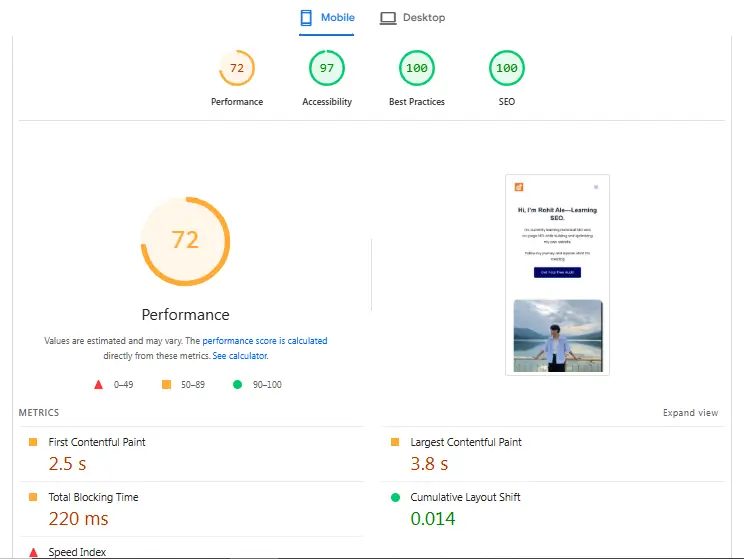
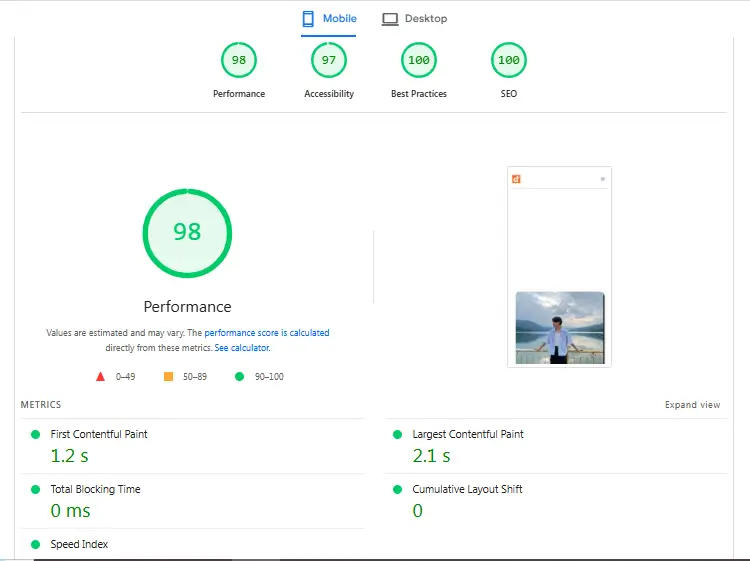
Before optimization, my website’s performance score was low. After fixing technical issues, I improved it from 72 to 98, which is a big improvement.
Before Optimization
Performance Results
Before making any changes, I tested my website using Google PageSpeed Insights.
Here were the results:
- Performance Score: 72 (Mobile)
- Largest Contentful Paint (LCP): 3.8 seconds
- Cumulative Layout Shift (CLS): 0.014
- Interaction to Next Paint (INP): Poor
- Total Blocking Time (TBT): 220 ms
These results showed that my website had performance issues that needed to be fixed.
Problems Identified
After analyzing the report, I found several technical SEO problems.
Unoptimized Images
Images on the website were large in size and not compressed. This increased loading time, especially for the main content (hero section), which affected LCP.
Unused CSS and JavaScript
There were many unused CSS and JavaScript files. These files were not needed but still loaded on the page, making the website slower.
Slow Largest Contentful Paint (LCP)
The main content of the page (hero section) took too much time to load. This created a poor user experience.
Render-Blocking Resources
Some CSS and JavaScript files were blocking the browser from showing content quickly.
Interaction Delay (INP Issue)
User interaction was not smooth because of heavy JavaScript. This affected INP.
Optimization Process
To improve performance, I fixed each issue step by step.
Image Optimization (Fixing LCP)
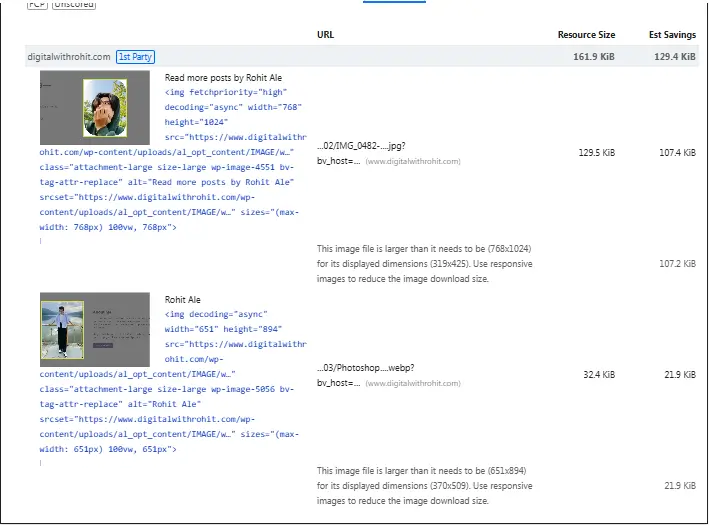
What I Did
- Compressed all images before uploading
- Converted images into WebP format
- Reduced the size of the hero image
Why It Matters
Images are usually the largest elements on a page. If they are not optimized, they slow down the loading speed.
Result
- Faster loading of main content
- Significant improvement in LCP
Removing Unused CSS and JavaScript

What I Did
- Removed unnecessary CSS and JavaScript files
- Minified CSS, JavaScript, and HTML
- Used the Airlift plugin
Why It Matters
Unused code increases page size and slows down loading speed.
Result
- Reduced Total Blocking Time
- Improved website performance
Smart Lazy Loading Strategy
What I Did
- Did not apply lazy loading to the hero image
- Applied lazy loading only to images below the fold
Why It Matters
Lazy loading is helpful, but if used on important content (like the hero image), it delays loading and worsens LCP.
Result
- Faster loading of visible content
- Improved LCP score
Fixing CLS (Layout Stability)
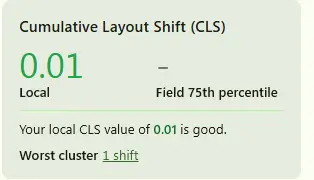
What I Did
- Added width and height attributes to images
- Avoided layout shifts during loading
Why It Matters
Unexpected layout shifts can create a bad user experience.
Result
- CLS improved from 0.014 to 0
- Local matrix CLS 0.01
- Stable page layout
Improving INP (User Interaction)

What I Did
- Reduced heavy JavaScript execution
- Optimized scripts for better performance
Why It Matters
INP measures how fast a website responds when a user clicks or interacts.
Result
- Faster interaction
- Better user experience
Hosting and CDN (Future Plan)
Current Situation
- Using shared hosting
Future Improvements
- Upgrade to better hosting
- Use a Content Delivery Network (CDN)
Expected Benefits
- Faster loading globally
- Better Core Web Vitals
After Optimization
Final Results
After fixing all issues, I tested the website again using Google PageSpeed Insights.
Here are the improved results:
- Performance Score: 98 (Mobile)
- LCP: 2.1 seconds
- CLS: 0
- INP: Improved
- Total Blocking Time: 0 ms
This shows a major improvement in website performance.
Key Learnings
- Image optimization plays a very important role in speed
- Lazy loading should be used carefully
- Removing unused CSS and JavaScript improves performance
- Core Web Vitals are important for both SEO and user experience
- Even small changes can create big improvements
Conclusion
This case study shows how I improved my website performance from 72 to 98 by fixing technical SEO issues.
I focused on real problems and solved them step by step. By improving Core Web Vitals like LCP, CLS, and INP, I created a faster and better user experience.
This project helped me understand technical SEO in a practical way.
Final Note
This case study is part of my hands-on SEO learning journey. I am continuously practicing and improving my skills by working on real websites.
If you are looking to improve your website speed or fix technical SEO issues, feel free to connect with me.